Abstract: Choosing the right trading platform is one of the most critical decisions a trader can make. In this comprehensive comparison, we break down the pros, cons, latency characteristics, and utility features of MetaTrader (MT4/MT5), WebTrader, and proprietary platforms, helping you identify which is best suited for your trading goals. We also highlight Tauro Markets as a case study to see how top-tier brokers support these platforms.

1. Introduction: The Gateway to the Financial Markets
For retail and professional traders alike, a trading platform is more than just a software tool-it is the gateway to the global financial markets. A delay of a few milliseconds (latency), a clunky interface, or the lack of specific charting tools can mean the difference between a profitable trade and a costly slip.
When you place a buy or sell order, that instruction travels from your device, through the internet, to the broker’s servers, and finally to the liquidity providers (banks and financial institutions) who match your trade. The efficiency of this path is heavily dictated by the platform software you choose.
Today’s trading landscape is dominated by three main types of platforms:
- MetaTrader (MT4 & MT5): The traditional, powerhouse desktop clients.
- WebTrader: The modern, web-browser-based, zero-installation clients.
- Proprietary Platforms: In-house software built by brokers tailored to their own ecosystems.
Understanding the balance between customization, performance, execution speed, and ease of use is essential to choosing the platform that matches your trading strategy.
2. MetaTrader (MT4 & MT5) - The Algorithmic Powerhouse
Developed by MetaQuotes Software, the MetaTrader suite-composed of MetaTrader 4 (MT4) and MetaTrader 5 (MT5)-remains the undisputed industry standard. Released in 2005, MT4 was built primarily for forex trading, while MT5, launched in 2010, expanded support to multi-asset classes including stocks, futures, options, and commodities.
Pros
- Advanced Automation: Full support for Expert Advisors (EAs) and MQL4/MQL5 scripting to automate trades 24/7.
- Massive Ecosystem: Thousands of custom indicators, charting tools, and automated bots available in the MetaTrader Marketplace.
- Deep Backtesting: Multi-threaded strategy tester on MT5 for tick-by-tick historical data testing across multiple assets.
- Low System Resource Usage: Highly optimized, lightweight application that runs smoothly on almost any PC.
- Complex Order Types: Supports diverse pending orders, including Buy/Sell Limit, Buy/Sell Stop, and MT5 Stop Limit orders.
Cons
- Outdated User Interface: Legacy design and layout reminiscent of early 2000s Windows software.
- Steep Learning Curve: Harder for beginners to configure templates, custom files, and coordinate EA setups.
- Installation Required: Must be downloaded and installed as a native desktop client for full utility.
Compiler Infrastructure and Execution Models
The underlying architectures of MT4 and MT5 differ significantly. MT4 compiles its proprietary language, MQL4, into a procedural byte code which executes on a single-threaded virtual machine. MT5, however, is built on a 64-bit multi-threaded runtime. MQL5 supports true Object-Oriented Programming (OOP) classes, inheritance, and polymorphic structures, executing up to 100 times faster than MQL4.
Furthermore, MT5 utilizes a distributed cloud testing network. While MT4 can only backtest a single currency pair on a single CPU thread, MT5 can split multi-currency optimizations across hundreds of CPU threads using the local network or the global MetaQuotes Cloud Network, completing complex calculations in minutes instead of weeks.
MetaTrader supports three distinct order execution models:
- Request Execution: The client requests a price quotation from the broker, receives the quote, and decides whether to execute at that price.
- Instant Execution: The order is sent to the broker at the price visible on the terminal screen. If the price changes in the market, the server rejects the order and returns a “requote.”
- Market Execution: The order is sent to the broker to be executed at the best available price in the market. There are no requotes, but slippage can occur under high volatility.
Latency and Execution Speed:
- Rating: Excellent (Low Latency)
- Details: Desktop MetaTrader terminals establish direct, optimized TCP/IP connections to the broker’s servers. When paired with a broker utilizing high-grade liquidity providers and NY4/LD4 server hosting, latency can drop below 5 milliseconds.
Best Suited For:
- Algorithmic and automated traders (using EAs).
- High-frequency traders (scalpers) who require immediate hotkeys and custom shortcuts.
- Technical analysts who rely on proprietary, custom-built indicators.
 MetaTrader Desktop Interface vs Modern Mobile Apps
3. WebTrader - The Browser-Based Convenience
WebTrader is a general term for browser-based interfaces that allow traders to log in to their accounts and trade directly from any standard web browser (Chrome, Safari, Firefox, Edge) without downloading any software. Most major brokers offer a version of WebTrader, often built using modern HTML5, CSS3, and WebSockets.
Pros
- Zero Installation: Instant browser login from any computer, laptop, or tablet.
- Modern UI/UX: Clean, highly intuitive design focused on simple navigation and search.
- Seamless Upgrades: Real-time platform updates applied directly on the broker’s servers.
- Universal Compatibility: Works identically on macOS, Windows, Linux, and ChromeOS.
Cons
- No Native Automation: Cannot run custom Expert Advisors or automated backtesting scripts.
- Limited Custom Charting: Users cannot import custom third-party indicator files.
- Browser Overhead: Slower rendering speed and higher RAM consumption under heavy charting workloads.
Browser Transport Protocols and Chart Rendering
Unlike desktop clients that transmit custom binary data structures directly over TCP/IP, WebTrader platforms run within a sandboxed browser environment. To receive real-time streaming price quotes, WebTraders establish persistent connection channels using the WebSockets protocol (RFC 6455). This protocol allows full-duplex communication over a single TCP connection, eliminating the heavy overhead of periodic HTTP polling.
For visual chart rendering, modern WebTraders leverage HTML5 <canvas> elements combined with WebGL API frameworks. WebGL communicates directly with the computer’s Graphics Processing Unit (GPU), allowing the browser to render hundreds of candlesticks, moving averages, and drawings smoothly at 60 frames per second.
However, because the browser engine must coordinate DOM updates, handle garbage collection, and manage active WebSocket streams within restricted memory boundaries, WebTraders consume significantly more RAM and CPU than native desktop applications when displaying multiple active charts.
Latency and Execution Speed:
- Rating: Good (Moderate Latency)
- Details: WebTraders run within standard browser containers and connect to broker servers via WebSockets or HTTP protocols. While perfectly fast for the majority of retail traders, they generally experience slightly higher latency (20ms - 50ms) than dedicated desktop software due to browser rendering overhead.
Best Suited For:
- Swing traders and long-term position holders who do not need millisecond-level execution.
- Casual traders who value simple navigation, clean layouts, and modern aesthetics.
- Traders who travel frequently or use multiple computers and need instant access.
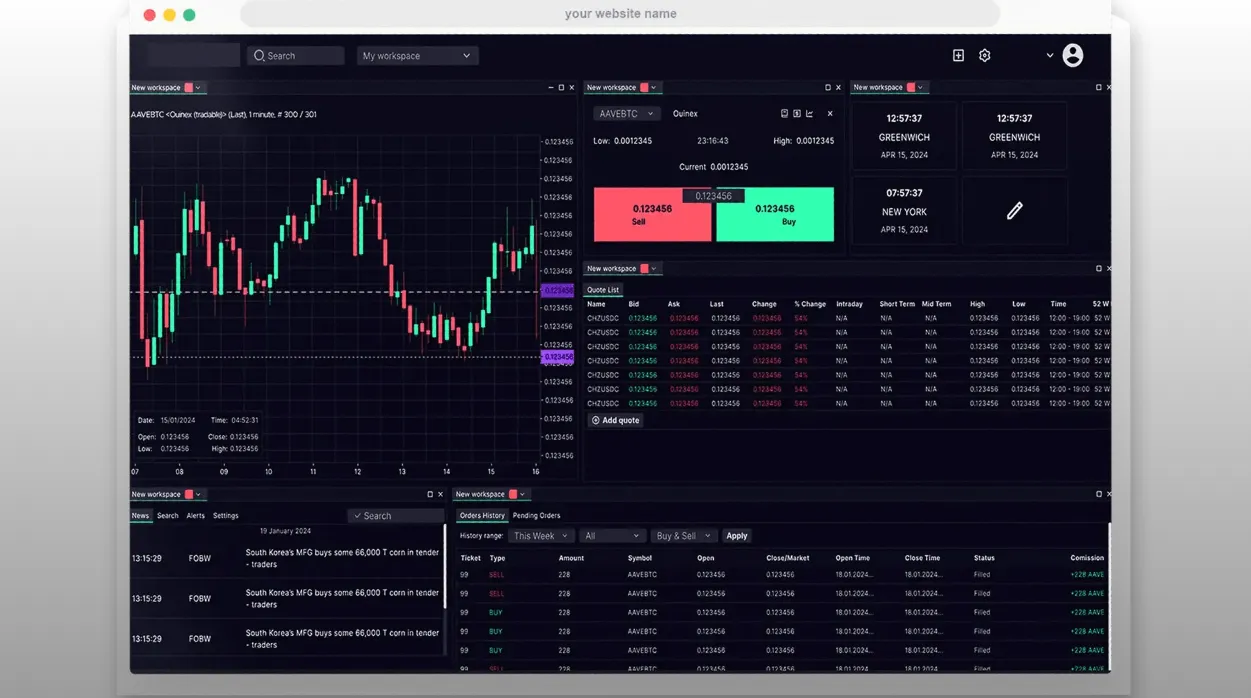 WebTrader Layout Showing Smooth Browser-Based Charting
4. Proprietary Platforms - The Bespoke Experience
Proprietary platforms are custom trading systems designed, developed, and owned by individual brokerage firms. Rather than relying on third-party licenses like MetaQuotes, these brokers build software from scratch to align with their specific product lines, user demographics, and branding.
Pros
- Bespoke UI & UX: Visually stunning, customized designs offering dark modes and interactive widget layouts.
- Integrated Ecosystem: Portals for funding, verification, education, and chat support are built into the workspace.
- Unique Native Tools: Includes proprietary risk tools (e.g. guaranteed stop-losses), sentiment indices, and live feeds.
Cons
- Broker Lock-in: Platform features and layouts are restricted to a single broker, increasing transition friction.
- Closed Ecosystem: No community marketplace or support for third-party scripts, indicator files, or add-ons.
- Basic Charting Limits: Generally offers fewer technical analysis charting tools than MT5 or TradingView.
STP/ECN Routing and FIX Protocol Architectures
Proprietary platforms are built to interface directly with a broker’s internal order routing engines and risk management desks. Depending on the broker’s business model, orders placed on these systems are processed in one of two ways:
- A-Book (STP/ECN Routing): Straight-Through Processing (STP) and Electronic Communication Network (ECN) routing directly bridge client orders to external liquidity providers (LPs). The platform packages the trade order and forwards it to LPs without broker intervention.
- B-Book (Market Making): The broker acts as the counterparty, executing the client’s trade internally within their own inventory and managing the risk in-house.
To connect to institutional liquidity networks, proprietary platform backend engines utilize the FIX (Financial Information eXchange) Protocol, usually version 4.4. The FIX protocol is a highly standardized, session-based messaging system that transmits structured strings containing field-value pairs (e.g., tag 35=D for a new order, tag 38 for order quantity). By communicating via FIX, a proprietary platform can route orders, retrieve real-time market depth data, and manage allocations across multiple global banks in microseconds.
Latency and Execution Speed:
- Rating: Variable (Dependent on Broker Infrastructure)
- Details: Latency can range from exceptional to poor depending entirely on how much the broker invests in their technological infrastructure. When built by premium brokers, proprietary platforms can be incredibly fast and tightly optimized.
Best Suited For:
- Beginners who want an all-in-one platform without setup friction.
- Traders who rely on broker-specific research, widgets, or social/copy trading networks.
- Investors looking for a clean, visually appealing trading environment.
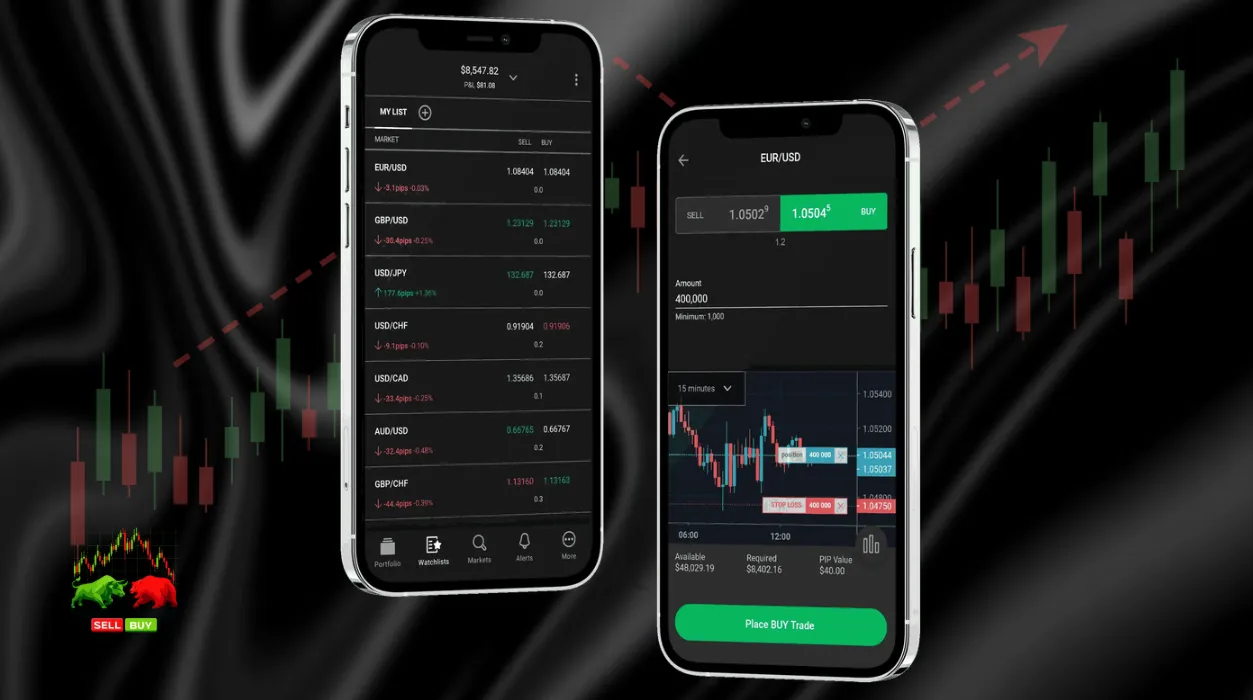 A Premium Proprietary Trading App Interface
5. Technical Comparison: Latency, Infrastructure, and Execution Speeds
To fully appreciate the difference between these platforms, it is important to understand the concept of execution latency-the time it takes for an order to be sent, processed, and confirmed. In the financial markets, where prices change in milliseconds, low latency is critical to avoiding slippage (the difference between the expected price of a trade and the price at which the trade actually executes).
Let’s look at the factors that control execution latency across platforms:
Network Protocol Overhead
- MetaTrader Desktop: Uses direct TCP/IP sockets to transmit binary packets. This is the most efficient way to communicate over the internet, minimizing protocol overhead.
- WebTrader: Typically relies on WebSockets wrapped in HTTP packets. While WebSockets are highly efficient, running them inside a browser engine adds a layer of rendering and processing delay.
The Role of VPS (Virtual Private Server) Hosting
For automated traders using MetaTrader, hosting their platform on a Virtual Private Server (VPS) is a common strategy. By placing the VPS in the same data center as the broker’s trading servers (colocation, usually in Equinix NY4 in New York or LD4 in London), network latency can be reduced to under 1 millisecond. This level of optimization is almost impossible to achieve on WebTrader or proprietary platforms, which require an active browser session or lack VPS integration.
Execution Path and Server Colocation
The physical path of a trade order is dictated by speed-of-light limitations inside fiber-optic cables (approximately 1 millisecond of transit latency for every 100 miles of physical fiber).
When a trade is triggered on a desktop MetaTrader terminal:
- The packet travels through the local internet service provider (ISP) to the broker’s edge gateway server.
- The edge server routes the message to the core trading server database.
- The core server validates the account balance, margin requirements, and executes the trade.
- If A-book routing is used, the order is matched with a liquidity provider via a cross-connect fiber link inside the same data center building.
Because MetaTrader servers are almost universally colocated inside primary financial hubs like Equinix NY4 (Secaucus, New Jersey) or Equinix LD4 (Slough, London), setting up your trading algorithm on a VPS inside the same data center bypasses steps 1 and 2, resulting in sub-millisecond local network execution speeds. WebTrader interfaces and proprietary platforms, by contrast, must route orders through additional web presentation servers to translate browser requests into core server commands, adding latency.
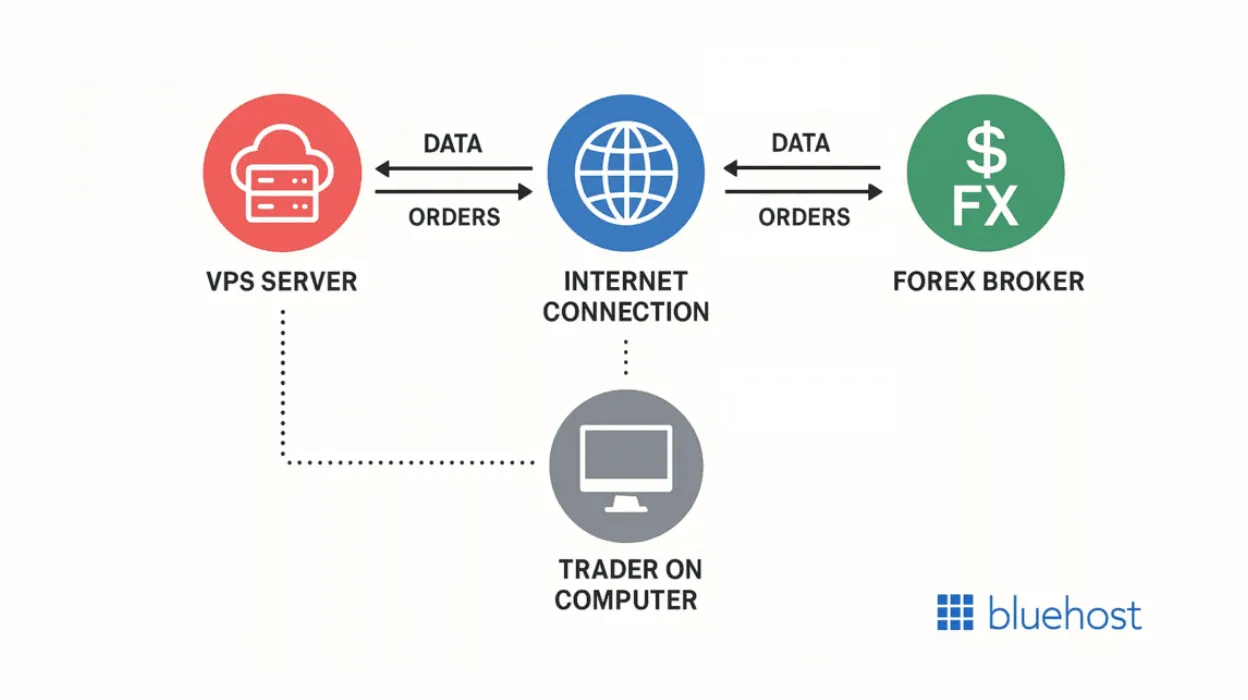 How VPS Colocation Reduces Trading Latency
6. Security and Data Integrity: Protecting Your Trading Capital
Security is a primary concern when connecting to financial networks. How your account credentials, transaction logs, and local configuration files are secured differs significantly between platforms.
Encryption Protocols and Session Management
All three platform types utilize standard cryptographic layers to secure data in transit. Standard WebTraders and Proprietary web apps use transport layer security (HTTPS/TLS 1.2 or 1.3) to encrypt communication between the browser container and the broker’s web server. MetaTrader uses its proprietary protocol, which employs asymmetric encryption (RSA) during authentication and symmetric encryption (such as AES-128 or AES-256) for subsequent data streams to ensure that order details, trade history, and account balances remain confidential.
Client-Side System Vulnerabilities
- MetaTrader (Desktop): Since MetaTrader compiles and runs code locally on your operating system, it has read/write permissions to specific folder structures. This open architecture allows you to import custom indicators and scripts, but it introduces a major security vector: malware. Downloading compiled scripts (like
.ex4or.ex5files) or importing custom DLLs from unverified forums can compromise your local machine, allow keyloggers to capture passwords, or execute arbitrary code. Securing your local Windows environment is critical when using MetaTrader. - WebTrader: Web-browser platforms benefit from the browser’s “sandbox” environment, meaning the platform cannot easily access or write to your local filesystem. This makes it immune to DLL injection or local execution malware. The principal threat is web-focused attacks, such as cross-site scripting (XSS), session hijacking (where session tokens stored in cookies are stolen), and phishing (using fraudulent landing pages that look like your broker’s interface to steal passwords).
- Proprietary Platforms: By operating in a closed, end-to-end sandbox, proprietary platforms minimize client-side risks. Brokers enforce strict security policies directly within their code, such as mandatory multi-factor authentication (2FA) via SMS, email, or authenticator apps (Google/Microsoft Authenticator) at login. They also deploy advanced device footprinting to alert users of logins from unrecognized locations and automatically log out inactive sessions to secure accounts left unattended.
7. Mobile Trading: Native Apps vs. Mobile Browsers
As mobile-first traders represent a larger share of the market, the performance of trading platforms on smartphones and tablets has become a critical evaluation point.
Native Trading Applications
Native mobile apps (like MT4/MT5 mobile or broker-built apps) are compiled specifically for iOS and Android. They are designed to interact directly with mobile hardware APIs, enabling smooth chart pinch-to-zoom gestures, customized haptic feedback, and efficient background execution. They also support native push notifications, which are essential for receiving instant margin calls or price alert triggers even when the app is closed.
Mobile Browser Environments
In contrast, trading via a mobile web browser is a zero-installation alternative, which can be useful on devices where trading apps are restricted. However, they lack the optimization of native code, leading to higher battery drain, slower execution, and occasionally clunky touch controls that make precision charting difficult.
 Native App Push Notifications vs Mobile Web Browser Interface
8. The Next Generation: AI, Web3, and Social Copy Trading
As fintech continues to evolve, the trading platform of tomorrow is incorporating cutting-edge technologies to enhance the decision-making process of retail investors.
Artificial Intelligence and Machine Learning
Modern interfaces are starting to integrate AI-driven assistants directly into the trading dashboard. These systems analyze real-time market data to suggest support/resistance levels, alert traders to unusual volume spikes, or automatically optimize trading parameters for automated bots based on recent market conditions.
Web3 and Cryptographic Infrastructure
The integration of Web3 allows traders to connect decentralized wallets directly to their trading accounts. This infrastructure supports instant deposits and withdrawals using stablecoins, bypassing traditional banking clearing times and lowering transaction costs.
Social Copy Trading Integration
Social trading modules allow retail clients to automatically copy the trades of experienced portfolio managers. While historically requiring external plugins, proprietary platforms increasingly integrate copy-trading directly into their main dashboards, showing performance leaderboards, historical drawdowns, and risk ratings for master accounts.
9. Customizability and Third-Party Extensions
The degree to which a platform can be modified to suit a trader’s visual preferences and mechanical needs is a major differentiator in user satisfaction.
Open Developer Ecosystems vs. Locked-Down Interfaces
- MetaTrader: Designed with an open API and a dedicated programming language (MQL), MetaTrader is highly customizable. Developers can build, compile, and run completely custom trading algorithms, indicators, panel overlays, and sound alerts. It also supports custom DLLs, allowing traders to link their terminal to external programming environments like Python or C# for complex analysis.
- WebTrader: Generally offers minimal customization. Users can choose between light and dark themes, resize panels, and save basic chart templates. However, it is a closed environment; you cannot import custom indicators, change the core hotkeys, or integrate third-party automation tools.
- Proprietary Platforms: These systems walk a middle ground. While they do not allow users to import external scripts, they often provide highly advanced modular workspaces. You can detach panels to span multiple monitors, create custom watchlists, and design tailored risk calculators. Some modern brokers also offer REST or WebSocket APIs for advanced retail clients, but the graphical user interface remains locked down to ensure stability.
10. Comprehensive Trading Platforms Comparison
Below is a technical matrix comparing the three types of trading platforms across core parameters:
| Feature / Criteria | MetaTrader (MT4/MT5) | WebTrader | Proprietary Platforms |
|---|---|---|---|
| Primary Access | Desktop App / Mobile App | Web Browser | Desktop/Web/Mobile (Broker Specific) |
| Execution Latency | Ultra-Low (< 5ms - 15ms) | Low to Medium (20ms - 50ms) | Low to Medium (Highly Variable) |
| Automated Trading | Yes (EAs, MQL4/MQL5 scripting) | No (Rarely supported) | Limited (Only if broker offers API) |
| Custom Indicators | Unlimited (Marketplace & Custom) | Limited to built-in tools | Limited to built-in tools |
| Ease of Use | Moderate to Hard (Steep learning curve) | Very Easy (Plug-and-play) | Easy to Moderate |
| System Overhead | Very Low | Moderate (Browser dependent) | Low to High |
| Hardware Compatibility | Windows (macOS requires emulator) | Universal (Any system with browser) | Universal / Broker specific |
11. How to Match a Platform to Your Trading Style
Choosing a trading platform is not about finding the software with the most buttons; it is about matching the technical architecture of the platform with your personal trading style and risk profile. Let’s break down the optimal choices for specific trader profiles:
The Algorithmic & Quantitative Trader
If your trading is driven by mathematical algorithms, statistical models, or automated bots, you require deep historical tick data, a multi-threaded strategy tester, and a platform that can run scripts 24/7 without human intervention.
- Optimal Choice: MetaTrader (MT4/MT5) Desktop Client hosted on a Virtual Private Server (VPS).
- Why: This setup ensures that your EAs run continuously with network latency under 2ms, insulated from local power outages or home internet dropouts. It allows you to write complex logic in MQL and perform backtests using raw market history.
The Scalper and Active Manual Day Trader
Manual day trading requires lightning-fast decision execution. You need to see immediate order book depth (DOM), execute trades with single-click hotkeys, and manage positions across multiple monitors without delay.
- Optimal Choice: MetaTrader Desktop or a high-end Proprietary Desktop Platform with layout detach capabilities.
- Why: Raw ECN execution speeds and hotkey maps are critical to lock in prices in highly volatile sessions. Detaching charts to separate monitors allows you to monitor indices, correlation pairs, and order tickets simultaneously.
The Swing Trader & Part-Time Investor
Swing trading relies on daily or weekly candlestick setups. Because you hold positions for days or weeks, execution latency of 50ms versus 5ms has no material impact on your profitability. Your priority is convenience, clean charts, and the ability to manage trades anywhere.
- Optimal Choice: WebTrader (on desktop or mobile).
- Why: You do not need to install software, set up emulators, or configure VPS hosting. You can log in securely from a laptop while traveling, execute your trade in seconds, set your Take Profit and Stop Loss levels, and close the browser.
The Copy Trader & Visual-First Beginner
If you are learning the ropes of forex, CFDs, or commodities, you need an environment that simplifies transaction costs, shows clear risk guidelines, and offers social copy-trading support to follow experienced managers.
- Optimal Choice: A modern, broker-developed Proprietary Web Platform.
- Why: These interfaces hide the complex, cluttered technical settings that confuse beginners, displaying key account health indicators in clean graphics. They merge copy trading, market analysis videos, client support, and deposit gateways into a single, intuitive interface.
12. Case Study: Trading Platforms Support at Tauro Markets
To understand how brokers bridge the gap between technical power and browser convenience, we can look at the platform offering at Tauro Markets.
Recognizing that traders have diverse requirements, Tauro Markets does not force users into a single environment. Instead, they support a multi-platform ecosystem designed to cover all trading profiles:
1. MetaTrader 4 (MT4) via Tauro Markets
For traders who demand advanced technical capabilities, Tauro Markets offers robust integration with MetaTrader 4 (MT4).
- Supported Devices: Windows and macOS desktop applications, alongside dedicated mobile apps for iOS and Android.
- Key Benefits: Direct access to MT4’s high-speed execution engines, complete support for Expert Advisors (EAs), and custom indicator hosting.
- Execution Infrastructure: Tauro Markets routes MT4 orders through high-performance servers, minimizing execution delay and slippage.
2. Tauro Markets WebTrader
For those who prefer trading directly from their browser, the broker provides the Tauro Markets WebTrader.
- Supported Devices: Any HTML5-compatible internet browser on desktop, laptop, or tablet.
- Key Benefits: Zero downloads, zero installations, a clean design, and immediate integration with the user’s Client Portal for quick funding and support access.
By providing both systems, traders at Tauro Markets can use the desktop client for deep backtesting and automated strategy execution at home, while monitoring and adjusting positions on the go via the WebTrader browser interface.
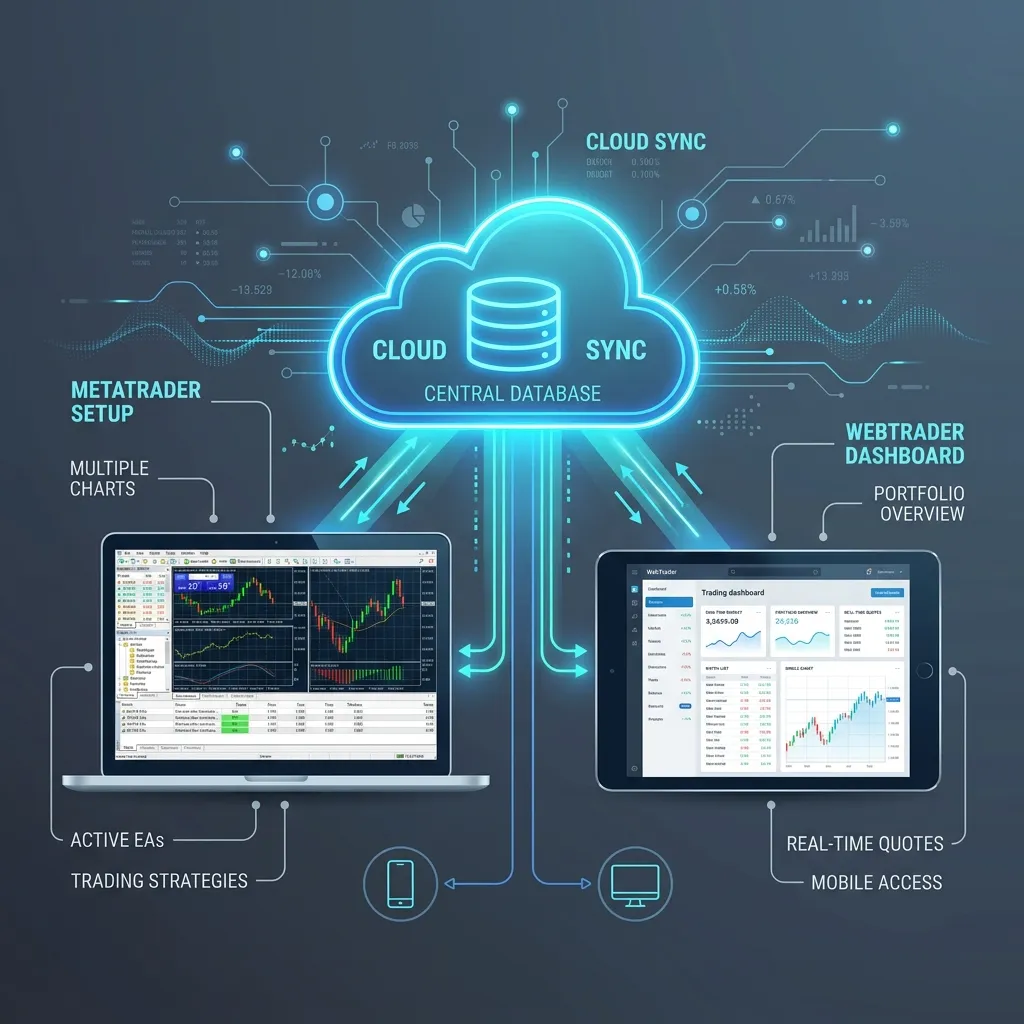 Unified Cloud Connection: Desktop MT4 for Algorithmic Backtesting and WebTrader for Live Management
13. Summary & Next Steps
There is no single “best” trading platform; there is only the best platform for your specific needs. Algorithmic traders will always find a home on MetaTrader, whereas casual investors will prefer the streamlined interface of WebTraders.
If you are ready to experience high-speed order execution across both desktop and browser interfaces, you can open a demo or live account to test these systems.
Conclusion: Trading platforms are standard utilities, but selecting the right layout can boost execution confidence. Traders should weigh their need for automation (MetaTrader) versus accessibility (WebTrader) before deciding on a broker and platform combination.